Features Pricing About Blog Contact Log In Start Free Trial

Everything you need to manage your practice visually.

Six core tools that turn your Clio data into clear, actionable workflow.

Kanban Boards

Your matters organized visually. Create boards for each practice area with columns that match your actual workflow. Drag cards as matters progress. See where everything stands without opening a single file.

  • Custom columns per practice area (Intake, Active, Pending, Billing, Close)
  • Drag-and-drop to update matter status instantly
  • WIP amount and deadline displayed on every card
  • Filter by responsible lawyer, practice area, or status
  • Color-coded cards highlight matters needing attention
Real-world example

A solo family law lawyer with 75 active cases uses one board for all family matters. She starts each morning by scanning the "Pending" column for matters that have sat too long, then drags two into "Active" for the day. Nothing falls through the cracks.

Intake
Thompson v. Smith
Estate of Williams
Active
Garcia Injury
Chen Real Estate
Patel Corp
Billing
Davis Contract

KPI Dashboard

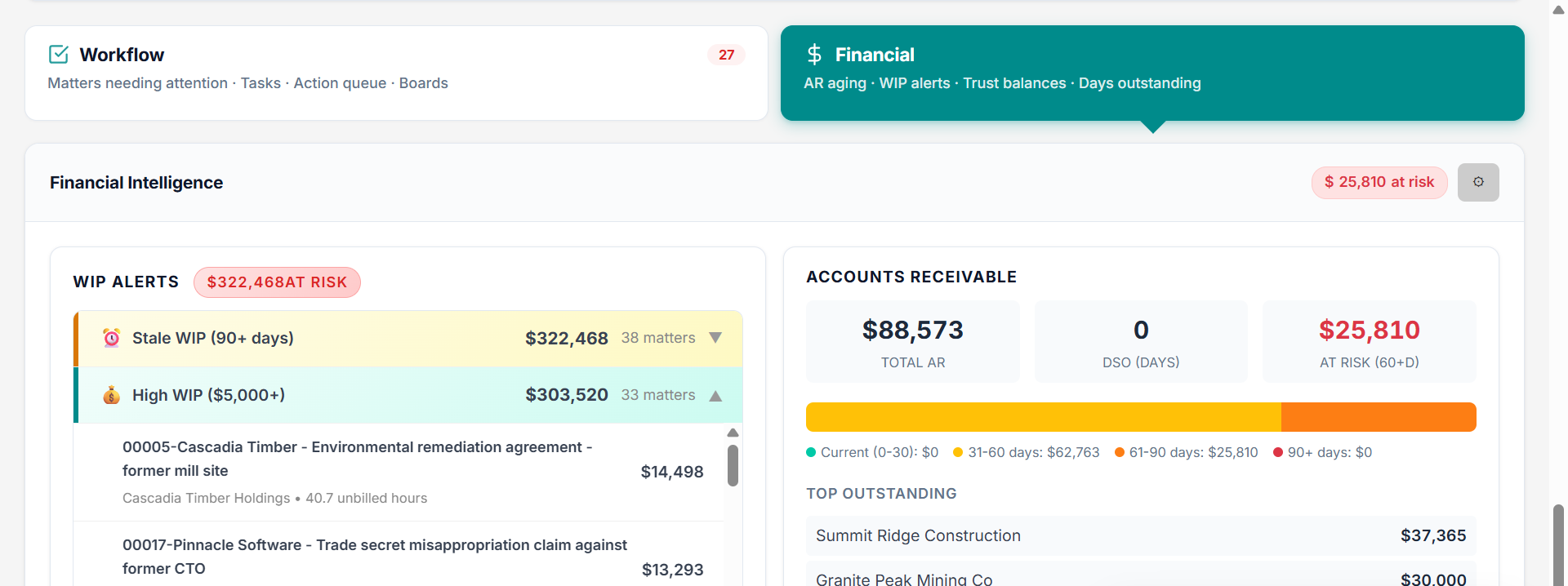
Real-time numbers for your practice. Total WIP, matters by stage, revenue trends, stagnant files. Data pulled directly from Clio and updated continuously.

  • Total WIP across all matters, updated from Clio time entries
  • Matters by workflow stage with trend lines
  • Stagnant matter alerts (no activity in 30+ days)
  • Revenue and billing performance over time
  • Per-lawyer productivity metrics for team firms
Real-world example

A personal injury firm discovers $200,000 in aging WIP through the dashboard. The managing partner identifies 12 matters with unbilled time over 90 days old and assigns billing tasks that week. They recover $47,000 in the first billing cycle.

$47.2K
Total WIP
64
Active Matters
3
Due This Week

Work Planner

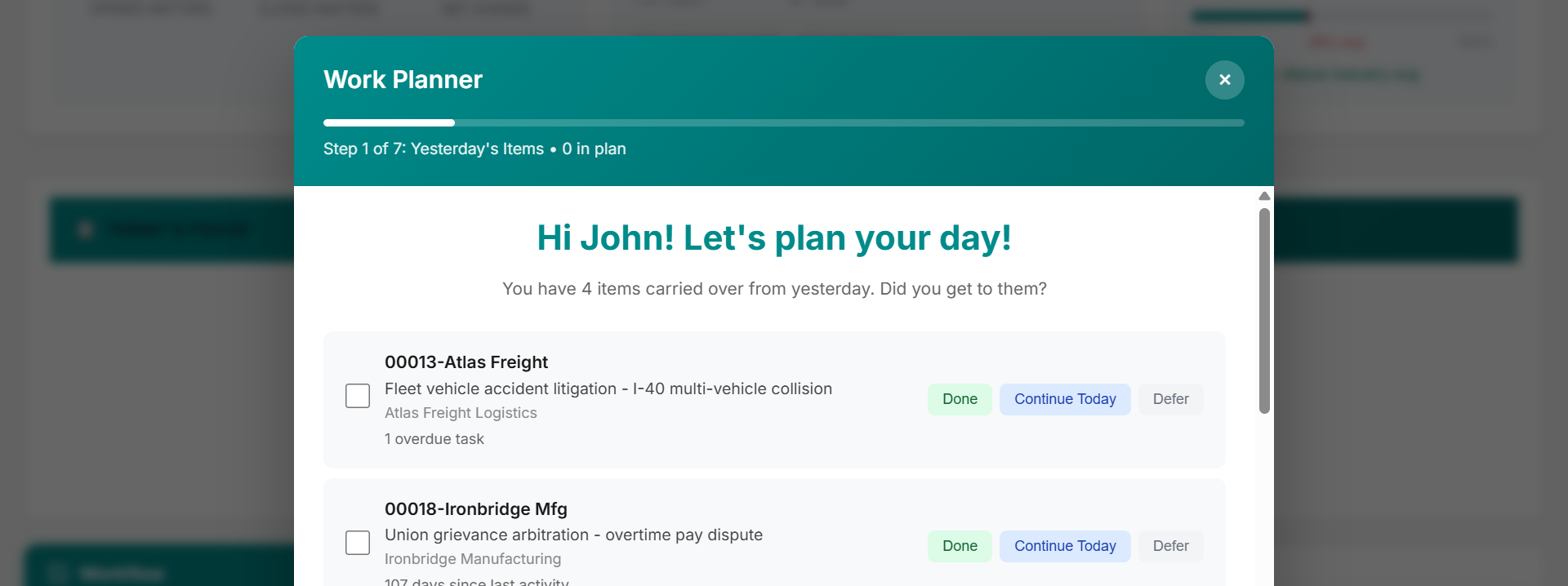
A 5-minute daily wizard that builds your priority list. It reviews yesterday's carryover, flags approaching deadlines, surfaces stagnant matters, and helps you commit to a focused plan for the day.

  • Structured morning review: carryover, deadlines, overdue, stagnant
  • Select 5-7 matters to focus on today
  • Track completion through the day
  • History log to review what you accomplished
  • Surfaces matters you might have forgotten
Real-world example

An associate starts each morning wondering what to work on. She opens the Work Planner, which flags 2 matters with deadlines this week, 3 stagnant files from last month, and yesterday's unfinished tasks. In 5 minutes she has a clear plan. No more lost mornings.

Review Garcia discovery responses
Call Morrison re: custody schedule
Draft Chen closing documents
Bill Davis contract dispute
Follow up Patel incorporation docs

Clio Integration

Connect your Clio account in 5 minutes. Matters, time entries, clients, and activities sync automatically — encrypted end-to-end and read-only. No double entry. No manual imports. Your boards always reflect current data, and MatterMind never writes back to Clio.

  • OAuth 2.0 secured connection (we never see your password)
  • All synced data encrypted at rest and in transit
  • Read-only integration — your Clio data is never modified
  • WIP calculated directly from your Clio billing data
  • Limitation dates imported and tracked automatically
  • Select which practice areas and matters to sync
Real-world example

A 6-lawyer firm connects Clio and imports 340 matters in under 10 minutes. Each matter appears on the right board with WIP amounts already calculated. The firm starts using MatterMind productively the same day they sign up.

Clio
sync
MatterMind

Alerts & Deadline Tracking

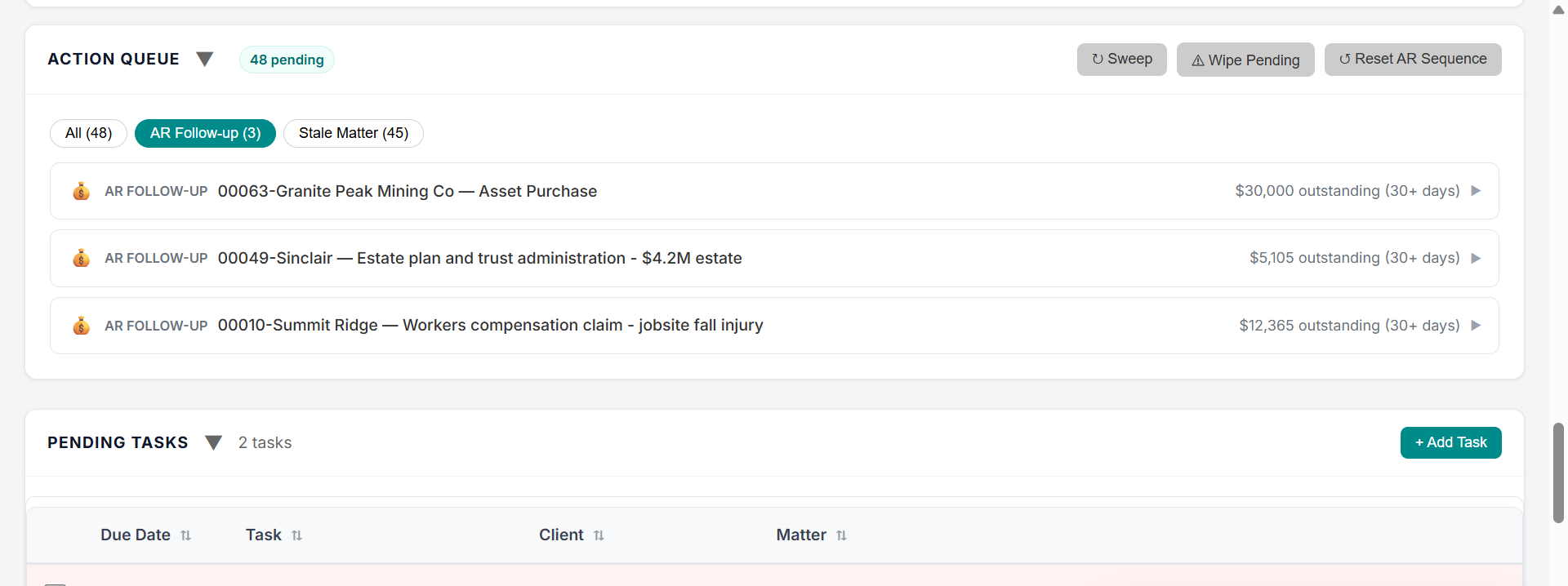
Limitation dates and deadlines synced from Clio, displayed on every matter card, and flagged in your Work Planner. Multiple layers of visibility so nothing slips.

  • Limitation dates with countdown warnings on cards
  • Dashboard alerts for deadlines within 14 days
  • Stagnant matter alerts (no activity in configurable days)
  • High WIP warnings for aging unbilled time
  • Daily Work Planner surfaces all approaching deadlines
Real-world example

An lawyer missed a statute of limitations once — never again. MatterMind shows a red countdown on the matter card, flags it in the morning Work Planner, and highlights it on the dashboard. Three layers of protection against missed deadlines.

Garcia v. Metro — Limitation in 5 days Urgent
Chen Real Estate — No activity for 34 days Stagnant
Davis Contract — WIP over $8,000 High WIP
Patel Corp — Task overdue by 3 days Overdue

Team Management

Invite your team. Share boards. Assign tasks. Control who sees what with role-based permissions. Everyone stays aligned without status meetings.

  • Invite team members by email
  • Role-based permissions (admin, lawyer, staff)
  • Shared boards with team-wide visibility
  • Assign tasks and track completion by team member
  • Per-lawyer workload view for managing partners
Real-world example

A managing partner at a 10-lawyer firm checks the team board each Monday. She can see that one associate has 28 active matters (too many) while another has 12. She rebalances workload before anyone burns out or drops a file.

SM
Sarah Martinez
Partner
24 matters
JL
James Lee
Associate
18 matters
RK
Rachel Kim
Staff
12 matters

See it in action with your own data.

Connect Clio, import your matters, and start managing visually. 14-day free trial.